
March 6, 2025
Guardian Backstage 3.0 introduces major infrastructure improvements designed to deliver faster, more insightful performance tracking. With significantly faster data refresh rates, users now have access to more up-to-date information when they need it most. This update also brings expanded data capabilities, offering next-generation insights into overall project and model performance. Paired with an all-new Power BI template, Backstage 3.0 features a larger, more intuitive layout with enhanced data visualizations, making it easier to understand and act on key metrics.
Watch the Guardian Backstage 3.0 release webinar.
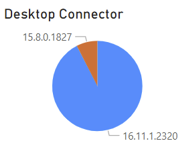
Still chasing down team members via email to confirm their Revit and Guardian versions? Now, you can quickly see which Revit versions, Desktop Connector, and Guardian versions users have installed on their machines.
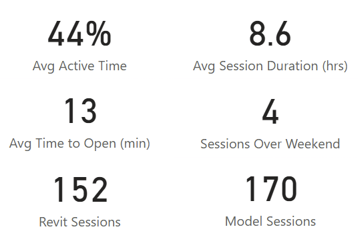
The Sessions dashboard will help you understand the average active time spent in the model, average session duration, average time to open, and sessions left open over the weekend, helping you get ahead of issues quickly.
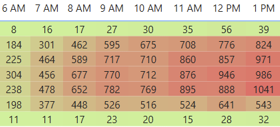
See data such as the number of sync conflicts avoided, average time between syncs, and syncs over time. Filter down further to gather crash information, such as when it happened, who it happened to, and what model it happened in.
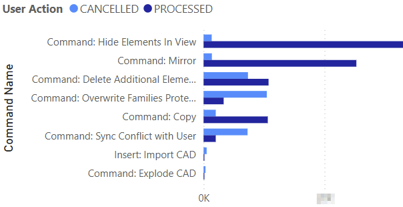
Get data on canceled vs processed commands, command count by user, command count by model, and more. Drill down even further to get insights into the active view and any elements that have been added, modified, or deleted.
We'd love to learn more about your challenges and explore a more proactive solution.
