.png)
We created Guardian to help firms tame Revit. And we’re proud to say: Mission accomplished! With our add-in, firms are managing their models, protecting their projects, and training their teams better than ever.
But we just had to go and improve our software even more. We’re funny like that …
We are thrilled to introduce Guardian 3.3. This latest version unlocks a new generation of Revit project protections, gives administrators and leadership greater access to data about their projects, and simplifies the Revit management experience for all users.
What follows is a short — at least as short as we could get it (yeah, we’re again beaming with pride) — list of additions and improvements in Guardian 3.3. These new features deliver smarter performance and deeper insights while making life in Revit easier for everybody.
Registered Projects
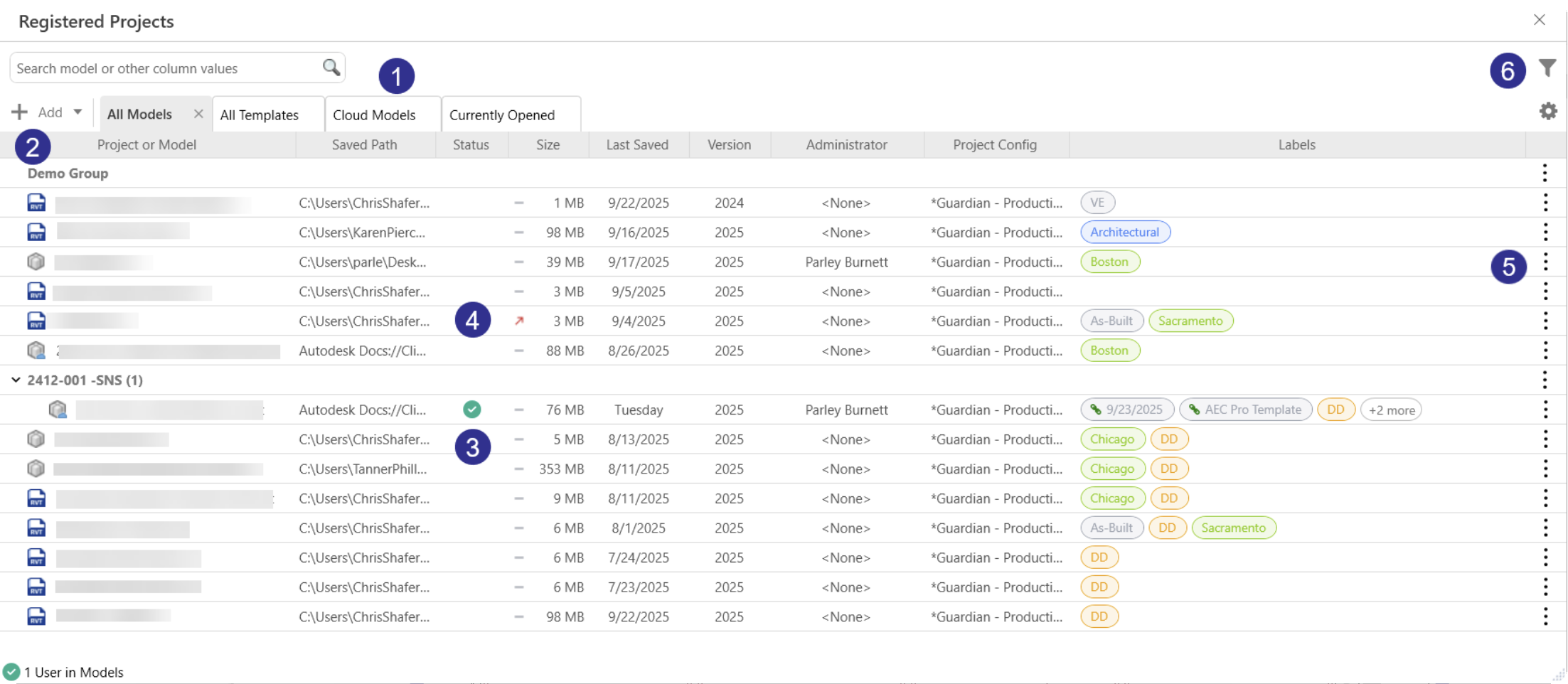
The first thing you will notice with Guardian 3.3 is how much we’ve improved the look, navigation, and capabilities of the Registered Projects dialog. Company and Project Administrators can now locate and organize projects faster than ever, and BIM managers and admins will enjoy new ways to monitor project performance and ensure consistency with standards, views, and templates.
Here are some of the Revit management improvements we’ve made to the Registered Projects dialog:
- New and custom tabs : A new Cloud Models tab automatically filters to show models in BIM 360/ACC, and a Currently Open tab highlights models actively open in Revit. Similarly, a My Projects tab automatically highlights projects in which you’re an admin (and gives you a personalized view by default), and Overridden Projects and Local Files tabs let you quickly see all projects with file overrides or stored locally, respectively. Furthermore, users can save filtered views and even create their own tabs to track, for example, file-size spikes, or recent activity, all from one dialog.
- Add dropdown: By choosing Add, admins can create and manage groups, build additional tabs tailored to their workflows, and, for company admins, manage labels (more on that later).
- Status column: This new feature helps BIM managers better monitor project activity by showing which models are open and, with a hover over the status icon, see who is currently in the model and for how long.
- Trend indicators: Users can now easily see if model size is increasing or decreasing over time, based on recent averages.
- Kebab menu: A kebab — that’s three vertical dots (⋮) — icon opens the action menu that allows quick access to send messages, open Project Central, launch Sync Monitor, archive or unregister models, edit labels, and much more.
- Filter Panel: Guardian 3.3 delivers impressive control customization with its new Filter Panel. With this feature, users can quickly search across a wide range of data fields (e.g., project names, groups, file location, version, last saved date, and more) to review project performance and activity. Filters can be applied on the fly or saved to custom tabs, which enables admins to build tailored dashboards.
- Interface adjustments: Guardian users spoke, and we listened. The new update makes several UX changes, including an option to automatically hide less-used columns in any tab; the ability to re-order tabs via drag-and-drop; and pagination-style navigation that eliminates endless scrolling to find projects.
Label Manager
We teased Label Manager in the last section, and you will appreciate the flexibility this new feature provides. Built into Registered Projects (and surfaceable in Guardian Backstage), Label Manager gives admins nearly unlimited ways to organize Revit projects with Registered Projects while improving the overall data architecture for firms.
For example, you can use labels to sort by discipline, isolate site models, or flag projects as ready for QA, and you can also create your own labels — whatever works best for the way your firm categorizes projects and data. Moreover, you can also link Label categories to text-based shared parameters (whose values populate through Project information), allowing Guardian to automatically generate labels from Revit project data, thus keeping project details accurate across Registered Projects.
Family Type Protections
Flexibility is one of Revit’s greatest strengths, but it is also often a curse, especially with family types. Well-meaning or inadvertent edits in the project by end-users can lead to inconsistencies, if not chaos, with firm standards. And fixing those inconsistencies via QA/QC takes time that is better spent focused on project improvement, collaboration, planning, team-building — just about anything that isn’t cleaning up messes in Revit.
With Guardian’s new Family Type Protections, admins can safeguard their firm’s Revit standards to reduce inconsistencies and improve efficiency. This feature offers Guardian’s three typical protection modes — Monitor, Guide, and Prevent — that protect the modification of family type properties. As a result:
- System family types are less likely to be accidentally edited.
- Loadable family types are preserved.
- Users are gently guided, through real-time notifications, on how to create project-level customizations without deviating from firm standards.
As is the standard with many other Guardian features, Family Types Protections provides actionable insights for admins and leadership.
View Template Protections
Revit’s view template functionality offers many ways to control visibility and graphics, which is great for visual consistency across drawings but can fly off the rails if it’s misused or modified. Guardian’s new View Template Protections restores clarity and consistency to your projects by reining in accidental edits.
Besides keeping users from making template changes they shouldn’t be making, View Template Protections:
- Highlights and/or limits editing access to approved templates.
- Gives end-users clear guidance for project-level customizations when they try to override template settings.
- Offers a “set it and forget it” approach that gives admins confidence to devote their energies to other, more proactive tasks.
View Filter Protections
View filters can quickly fall out of alignment when edited freely. With new View Filter Protections, admins can now Monitor, Guide, or Prevent these actions using rule-based conditions. This feature expands Guardian’s protection framework, preventing unauthorized edits to view filters just as with View Templates and Type Protections — and closing another gap in Revit model standardization.
All Commands Protections
From our humble beginnings, Guardian incorporated our foundational Monitor, Guide, and Prevent into Revit commands that are most misused. If you appreciated that straightforward and effective functionality, you’ll love what we’ve done with our latest update: We’re extending Monitor, Guide, and Prevent so their full set of protections now encompasses all API-available Revit commands.
Essentially, you’ll be able to apply Guardian protections to just about every corner of Revit. This will provide complete visibility into the system, allow admins to customize guidance across every modeling and documentation workflow, and empower BIM managers to shape how users model, document, and learn — one command at a time.
Warnings Tracking Protections
What began as a warning tracking feature in Guardian 3.0 has evolved. By adding the familiar Mode and Messages columns, Guardian’s protection behaviors now also apply to Revit warnings, letting admins guide or prevent concerns just as they do for user interactions and commands.
Also New and Improved
Here’s a look at other notable improvements in Guardian 3.3:
- Company Settings: Six company-level commands have been added to the Company Settings dialog — each can be adjusted by choosing Monitor, Guide, or Prevent, and a custom message can be written for users who trigger the command. The commands are:
- View: Keyboard Shortcuts
- Manage: Macro Security
- Manage: Macro Manager
- Collaborate: Restore Backup
- Collaborate: Show History
- Collaborate: Worksharing Monitor
- Notification frequency: Frequency first arrived in Guardian 2.7, and teams immediately felt the difference — smarter, well-timed guidance instead of constant interruptions. Since then, we’ve been bringing that same intelligence to more of Guardian’s protection triggers. By extending this feature to rule-based Custom Interactions in Project Configurations and User Commands in Company Settings, these enhancements create a more consistent, predictable, and less interruptive experience for users while maintaining firm standards.
- Background processing: We’ve upgraded Guardian to handle more batch workloads and tasks. This will deliver better, more consistent performance for all users.
- Automatic grouping: With the new update, Guardian instantly creates Groups based on ACC project names and assigns models to them, saving BIM managers time and effort otherwise spent in manually setting up and overseeing organized, accurate Group structures.
- Smarter project registration: We’ve improved how Guardian tracks registrations, making them more reliable through model updates and maintenance. Additionally, when a new model is registered and shares the same name and path as a previous one, Guardian lets you choose to reuse your latest registration or create a new one.
The Guardian Revolution
Guardian already had fundamentally transformed the way firms use, organize, and benefit from Revit. Guardian 3.3 takes that transformation to another level. At the risk of being cliché, we really have changed the game — and your Revit management will never be the same.
If you currently use and enjoy Guardian, be sure to download 3.3 and its release notes to immediately take advantage of all the improvements and enhancements. If you aren’t yet a customer, the best way to experience everything Guardian has to offer is by scheduling a demo. We think you’ll be impressed!